AI Meal Scanner

Photo Calorie Tracker - Calories and Macros in Seconds

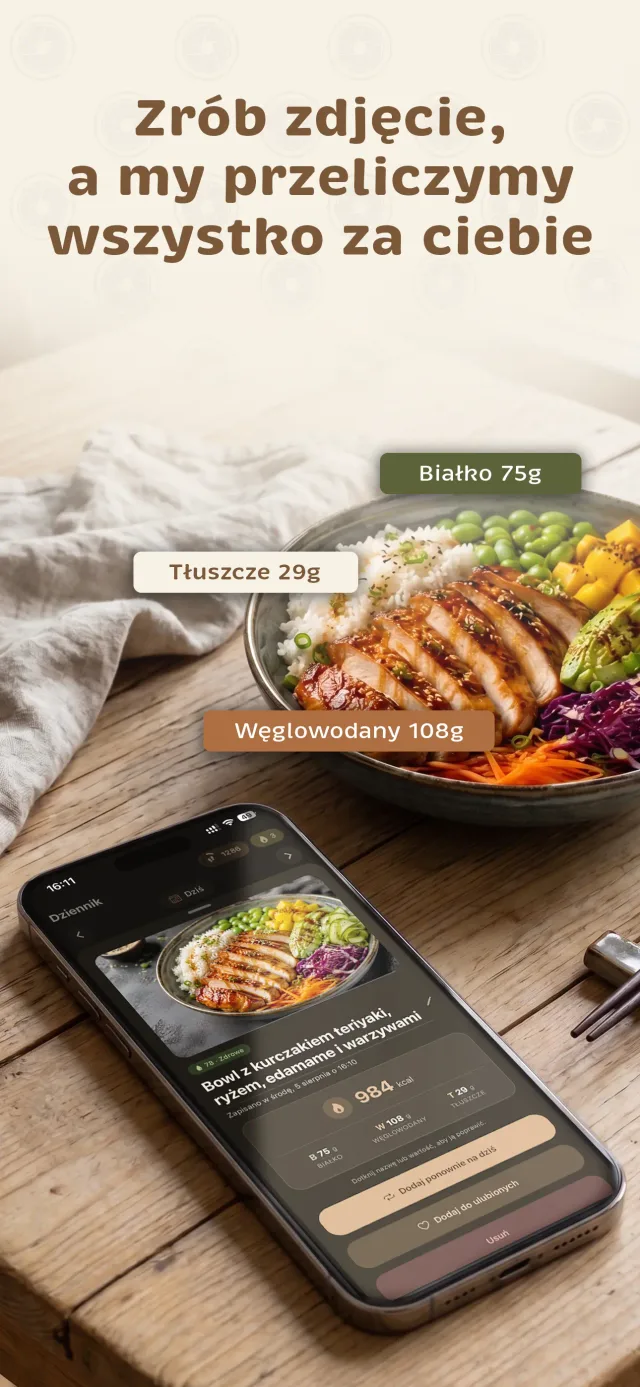
Point your phone at your plate and take a photo. AI identifies the dish, estimates the serving size, and shows calories, protein, carbs, fat, fiber, sugars, salt, and a rating of how healthy the meal is.

  • The dish name and calories appear while the analysis is still running
  • Edit each ingredient: change its weight, deselect it, or add your own
  • 3 free AI analyses per day, significantly more with Premium

The app is free to download. Premium is optional.

EatSee photo analysis result: teriyaki chicken bowl with rice and edamame—984 kcal, 75 g protein, 108 g carbs, and 29 g fat

How to Count Calories From a Photo

  1. Take a photo

    Point your camera at your plate and tap. With up to 10x zoom, you can get the plate in frame without leaving the table.

  2. AI analyzes your meal

    The dish name and calories appear while the analysis is still running. Soon after, you'll see protein, carbs, fat, fiber, sugars, salt, and a meal rating.

  3. Edit and save

    Deselect anything that wasn't on your plate, change the weight, or add an ingredient. Save the meal to your food diary with one tap.

What EatSee's Meal Scanner Can Do

Recognizes a whole dish

AI doesn't just identify individual foods. It can analyze a plate with several ingredients, such as chicken with rice and vegetables, and estimate the whole meal.

Editable ingredients

The result lists ingredients and their weights. You can deselect anything that wasn't on your plate and add your own ingredients. Ingredients assumed by AI are marked.

Refine the result

Something look off? Clarify the result in one sentence or change the number of pieces. You can also tap names and values to edit them.

Fiber, Sugars, and Salt

See these values for every photo and against daily recommendations in your daily summary. Values are estimates.

Also available with a free account

Meal rating

Each meal gets a health rating, such as “78 · Healthy,” to give you an idea of how your plate stacks up.

Up to 10x zoom

The camera offers up to 10x zoom, plus 0.5x on iPhones with an ultra-wide lens. You can view your meal photo full-screen later.

Free

  • 3 AI analyses per day
  • Scan barcodes without using AI analyses
  • Fiber, sugars, and salt for every meal

Premium

  • Significantly higher daily AI analysis limits
  • More voice logging entries per day
  • Weekly report and PDF food diary export
See Premium pricing

How Does Photo Calorie Tracking Work?

Take a photo of your plate, and AI identifies the dish and its ingredients. It then estimates the serving size and uses that to calculate calories, protein, carbs, fat, fiber, sugars, and salt. The dish name and calories appear while the analysis is still running, so you're not staring at a blank screen while you wait.

After the analysis, you'll see a list of ingredients and their weights. If AI misses something or estimates too large a serving, you can fix it right away. Calories and macros update automatically. Save the finished result to your food diary with one tap.

How Accurate Is a Photo Calorie Tracker?

A photo gives you a useful estimate, not a gram-by-gram measurement. The camera can't see everything:

  • Fat used for frying - a tablespoon of oil adds about 90 kcal that won't show up in the photo,
  • Sauces and extras underneath - such as butter under potatoes or dressing in a salad,
  • Plate depth - the same serving of pasta looks smaller in a deep dish.

That's why it's worth checking the ingredients and fixing anything that looks off. A few seconds reviewing the result can help more than even the best photo. We cover this in detail in Can You Count Calories From a Meal Photo?

Photo, Barcode, or Voice?

Each method works best in a different situation:

  • Food on a plate - dinner at home, lunch at work, or a restaurant meal is quickest to add with a photo.
  • Packaged food - yogurt, a snack bar, or cereal is best scanned. The values then come from the product data, and the barcode scanner doesn't use AI analyses.
  • A meal you've already eaten - if there's nothing left to photograph, say what was on your plate in one sentence. See how to add a meal by voice.
  • A meal you eat often - save it to your favorites and add it with one tap.

It Recognizes Polish Dishes, Too

EatSee was built for the Polish market. Its AI recognizes pierogi (dumplings), breaded pork cutlets (schabowy), sour rye soup (żurek), stuffed cabbage rolls (gołąbki), and other everyday dishes. With homemade food, the recipe makes a big difference: two pork cutlets can differ by as much as 200 kcal depending on their size, breading, and cooking fat (check how many calories are in a pork cutlet). That's why it's worth checking the ingredients in the result.

You can also find typical values for popular foods in our calorie chart.

What Happens to Your Photo?

Your photo goes to our AI service provider solely to generate a result. It's also saved with your meal in your food diary in the app. Deleting your account also deletes your meal photos. See our privacy policy for details.

The photo calorie tracker is part of EatSee, which also includes a food diary with goals, water and weight tracking, and a meal plan. Explore all the features on our calorie tracking app page.

FAQs

Is the photo calorie tracker accurate?
It's an estimate. AI is good at recognizing dishes and ingredients, but it can't weigh your food, so portion sizes, hidden fat, and sauces are common sources of error. In EatSee, you can edit every result: change the weight, deselect an ingredient, or add a missing one.
How many photos can I analyze for free?
A free account includes 3 AI analyses per day. Your limit resets daily, and you can see how many you have left in the app. Premium offers significantly higher daily limits under a fair use policy. Scanning barcodes doesn't use AI analyses.
What if the AI gets a dish wrong?
Tap a name or value to edit it. You can also deselect an ingredient that wasn't on your plate, change the weight, add your own ingredient in grams or pieces, or clarify the result in one sentence.
Does the app recognize Polish dishes?
Yes. EatSee was built for the Polish market, and its AI recognizes Polish dishes such as dumplings (pierogi), breaded pork cutlet (schabowy), and sour rye soup (żurek). For homemade dishes, where the recipe can make a big difference, it's worth checking the ingredients in the result.
How should I take a photo for a better result?
Take the photo in good light, with the whole plate in frame and the ingredients visible. If something isn't visible, such as oil, butter, or sauce underneath, add it after the analysis. For more tips, read Can You Count Calories From a Meal Photo?
What happens to my meal photos?
Your photo goes to our AI service provider solely to generate a result. It's also saved in your EatSee food diary. Deleting your account also deletes your meal photos. See our privacy policy for details.

Nutrition information in EatSee is estimated, and the app is for informational purposes—it doesn't replace advice from a doctor or dietitian. If you have a medical condition or are pregnant or breastfeeding, set your goals with a professional. Where the app gets its data.