Barcodes and labels

Food Barcode Scanner - Product Calories and Macros

Scan a store-bought product's barcode, choose a serving, and log your meal. EatSee shows calories, protein, carbs, and fat, plus fiber, sugars, and salt. Barcode scans don't use AI analyses, even with a free account.

  • Barcode scans don't use AI analyses
  • Serving: 100 g, the serving on the package, or your own amount
  • Product not in the database? Photograph the label

The app is free to download. Premium is optional.

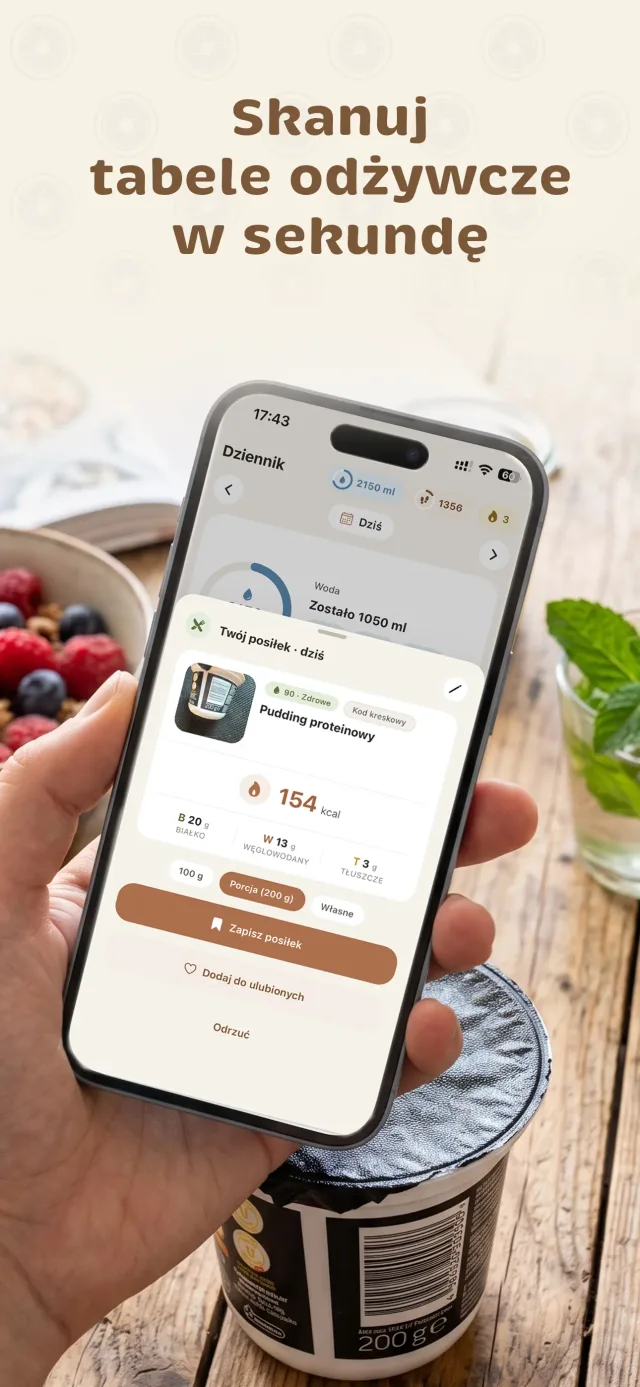
Product added by barcode in EatSee: protein pudding, 154 kcal per 200 g serving, with a serving selector and Log meal button

How to Scan a Barcode in EatSee

  1. Scan the barcode

    Point your camera at the barcode on the package. EatSee will look up the product and show its nutrition information.

  2. Choose a serving

    Choose 100 g, the serving on the package, or your own amount. Calories and macros will adjust to what you actually eat.

  3. Log your meal

    Add the product to your food diary with one tap. If you eat it often, add it to your favorites to make logging even faster next time.

What EatSee's Barcode Scanner Can Do

No AI analyses used

Scan barcodes for free with a free account or Premium, even after you've used your daily AI analyses.

Free

Label photo

Product not in the database? Photograph the nutrition information on the package and choose a serving. EatSee will calculate the values for your serving.

Products from Polish stores

The barcode database includes products sold in Polish stores. Products added from label photos go into EatSee's shared database.

Fiber, Sugars, and Salt

Barcode-scanned products also show fiber, sugars, and salt. Your daily summary shows how they compare with daily guidelines.

Product rating

Scanned products get a health rating, such as “90 · Healthy,” just like meals logged from photos.

Favorite products

Eat the same yogurt every day? Add it to your favorites and log it with one tap, without scanning it again.

How Does the Barcode Scanner Work?

Point your camera at a barcode, and EatSee looks up its number in EatSee's shared product database and an open, public food product database. If it finds the product, you'll see its calories, protein, carbs, fat, fiber, sugars, and salt.

Values come from product data, not AI estimates, so barcode scans don't use AI analyses. Scanning works with a free account and Premium, even after you've used your daily analyses.

You choose the serving: 100 g, the serving on the package, or your own amount. That matters because the serving listed on the label isn't always what you actually eat. A bag of chips or a chocolate bar eaten in one sitting often contains several servings as defined by the manufacturer.

Barcode, Label, or Meal Photo?

  • Packaged product - scan the barcode. It's the fastest option and doesn't use AI analyses.
  • Product not in the database - photograph the nutrition information on the package. The product will be added to EatSee's shared database.
  • Meal on your plate - add a home-cooked meal or restaurant dish with a photo. See how the photo calorie tracker works.
  • Fruit, vegetables, and products sold by weight - these don't have barcodes. Check their calories in our calorie chart, then add them in the app by photo or voice.

How to Enter the Right Serving

The scanner knows the product's nutrition information, but not how much you'll eat. A few simple tips:

  • Snacks and sweets - check the weight of the whole package and enter how much you actually eat.
  • Cereal, nuts, and oils - for calorie-dense foods, it's worth weighing your serving or measuring it with a tablespoon. Our kitchen measurement converter can help you work out how much a tablespoon or cup weighs.
  • Drinks - for juice or drinkable yogurt, check whether the serving is listed in milliliters or grams.

For step-by-step instructions and common mistakes, read our article How to Scan a Product Barcode with Your Phone.

What Should You Look At Besides Calories?

For store-bought products, it's worth checking more than calories. EatSee also shows fiber, sugars, and salt, and compares them with guidelines in your daily summary: at least 25 g of fiber, sugars accounting for no more than 18% of your calorie goal (90 g at 2000 kcal), and no more than 5 g of salt. Sweetened yogurts, breakfast cereals, and ready-made sauces can quickly use up a sizable share of your daily sugar or salt limit.

The barcode scanner is one of EatSee's features, alongside photo and voice calorie tracking and meal plans. Explore them all on our calorie tracking app page.

FAQs

Is barcode scanning free in EatSee?
Yes. Barcode scans don't use AI analyses. You can scan for free with a free account or Premium, even after you've used your daily AI analyses.
What if a product isn't in the database?
Take a photo of the nutrition information on the package. EatSee will read the values and calculate them for your chosen serving. The product name and values read from the label will be added to EatSee's shared product database, which other users can also access.
Does the scanner work with Polish products?
Yes. The barcode database includes products sold in Polish stores. If a product isn't there yet, you can add it with a photo of its label.
Where does the product information come from?
EatSee looks up the barcode number in EatSee's shared product database and an open, public food product database. Values come from product data, not AI estimates. Manufacturers sometimes change recipes, so compare the result with the label if something doesn't look right.
Can I change the serving after scanning?
Yes. Choose 100 g, the serving listed on the package, or your own amount, and the calories and macros will update right away. If you eat half the package, simply enter half its weight.
Does the scanner show fiber, sugars, and salt?
Yes. For each barcode-scanned product, you can see fiber, sugars, and salt. Your daily summary compares them with these guidelines: at least 25 g of fiber, sugars accounting for no more than 18% of your calorie goal, and no more than 5 g of salt.

Nutrition information in EatSee is estimated, and the app is for informational purposes—it doesn't replace advice from a doctor or dietitian. If you have a medical condition or are pregnant or breastfeeding, set your goals with a professional. Where the app gets its data.